Latest Updates
VERSION 2.1.0
At AlbumTeller, your feedback drives our innovation. We are thrilled to share the latest updates based directly on the suggestions we’ve received from our users, bringing significant enhancements to the photographer workflow and productivity
Text tool in free mode
VERSION 2.1.0 | 22.10.26
Type straight on the page
Adding text to a free-mode page now takes a single step.
-
Press T or the text button to start the text tool.
-
Click on the sheet to place a text box, or drag to set its width.
-
Type straight away, with no extra clicks.
Work with two monitors
VERSION 2.1.0 | 22.10.26
The photos list in the manual editor and the chapters list in the automatic editor can now open in their own window. Keep your photos on one screen and the album on the other.
-
Open in a separate window moves the list to its own window.
-
Return to the editor window brings it back.
Empty chapters
VERSION 2.1.0 | 22.10.26
In the automatic editor you can now insert an empty chapter between existing chapters and fill it later.
Refer & Earn
VERSION 2.1.0 | 22.10.26
A new card in your profile brings your referrals together in one place.
-
Your referral code and invite link.
-
The credit you have earned and the friends you have referred.
-
The programme terms in your language.
Galleries selections in the desktop app
VERSION 2.1.0 | 22.10.26
When a client submits a selection in Galleries, the Galleries link now opens it directly in the AlbumTeller desktop app.
Improvements & Fixes
VERSION 2.1.0 | 22.10.26
-
Faster startup – system fonts now load in the background after the app opens.
-
A steadier editor – it keeps responding after an operation fails; switching a page back to reactive mode, deleting photos, undo and redo no longer stop working until a restart.
-
Free-mode pages – protected in the automatic editor, marked with a “Free mode” badge and can be reverted to reactive mode.
-
Free mode – photos larger than the sheet no longer block clicks, Escape clears the selection, and delete, duplicate, copy, paste and nudge work on multiple items.
-
Undo in the automatic editor – restores deleted photos, pages in their original position and each page’s styles.
-
Text with ligatures – wrapped text keeps every letter with fonts such as Lato.
-
Stay signed in – when the server is briefly unreachable at startup.
-
Application menu – matches each screen, and its Undo and Redo act on the album.
-
Smaller windows – the automatic editor’s top bar fits, and guides stay visible in the page dialog.
-
Proofing – a project imported from another account can be sent as a new proof, and accounts without Proofing no longer check for proofing notifications.
-
Stability – fixes for notifications, photos changed on disk, save conflicts and new projects created from lab products.
Free transform mode
VERSION 2.0.0 | 07.10.26
Total freedom on the page
Place, resize and rotate photos and text freely on the page.
-
Text stays editable as text layers in PSD and InDesign exports.
-
Redesigned photo menus in free mode.
Export to InDesign
VERSION 2.0.0 | 07.10.26
Export your album to InDesign (IDML), with editable text layers.
Black & white per photo
VERSION 2.0.0 | 07.10.26
Turn any photo to black & white with a single toggle.
-
Applied in JPG, PSD and InDesign exports.
-
Also shown in proofs and thumbnails.
One colour picker
VERSION 2.0.0 | 07.10.26
One colour picker across the app, with an eyedropper.
-
A chapter tab menu in the manual editor.
Proofing invites
VERSION 2.0.0 | 07.10.26
Write better invites for your clients.
-
Format the invite message.
-
Insert the guest’s name, the album and the expiry date.
-
Save messages as reusable templates.
Galleries: selection expiry
VERSION 2.0.0 | 07.10.26
Set an expiry date on a selection, with quick presets.
Improvements & Fixes
VERSION 2.0.0 | 07.10.26
-
Imported projects – projects without an album format now ask you to choose one.
-
Project names – up to 60 characters long.
-
Safer saving – autosave keeps running after a save error and no longer blocks leaving the editor; a project with no pages loaded is no longer saved over its file on disk; files that are not projects are no longer deleted from the projects folder.
-
Fewer crashes – export, previews, proofing and PSD no longer crash on a broken page or photo; products a lab has removed no longer cause errors in the editors; gallery server errors are shown instead of crashing the app.
-
Editors – the Delete key in the manual editor removes the selected photo from its frame; removing sheets when every chapter has only one shows a message instead of an error; Cmd+Q and other window shortcuts no longer shuffle the page; unlinked frames no longer share border, gap and padding values; auto mode’s “Other Photos” chapter is no longer carried into manual projects; the chapters slider no longer hangs on a chapter with a locked or empty page; the photo selection stays in place when the sidebar panel resizes the spread.
-
Photos – frames keep their ratio and crop when a photo file changes on disk; photos stored online but not yet downloaded to the computer no longer fail; the relinked cover photo is no longer requested every time a project opens.
-
Export and preview – PSD export places photos correctly inside thick borders; album preview shows spreads at full width and no longer drops the last spread.
-
Notifications – notifications and gallery selections keep refreshing after a timeout or server error; accounts without Galleries no longer see access-denied popups; update notices no longer pile up when the app stays open for a long time.
-
Account – a typed device PIN is sent only once; password recovery shows “invalid code” for an email without an account; the VAT number can be cleared.
-
Proofing – shows “expired” instead of “approved” after the deadline, and dates follow the app language.
-
Languages – corrected the German and Italian label for the projects folder.
Photos and Galleries
VERSION 1.9.0 | 09.06.26
New ways to sort your photos and to work with Galleries.
-
Date taken – sort and filter photos by “Date taken” (read from the photo’s EXIF), alongside “File date”.
-
Galleries on your licence – Galleries now shown on the licence cards.
-
Unsubmitted selections – a warning before importing a gallery selection the client has not submitted yet.
-
Gallery Link – move a Gallery Link from one project to another.
-
Large uploads – sent in parts, with a clear message if a photo fails.
Improvements & Fixes
VERSION 1.9.0 | 09.06.26
-
Export errors – now suggest closing Photoshop, Lightroom or other memory-heavy apps.
-
PSD export – uses less memory on large spreads.
-
Chapters slider – works with a single chapter.
-
Favourite templates – show for every page.
-
Notifications – no longer triggered by changes made on the same computer.
Selection Galleries
VERSION 1.8.0| 17.04.26
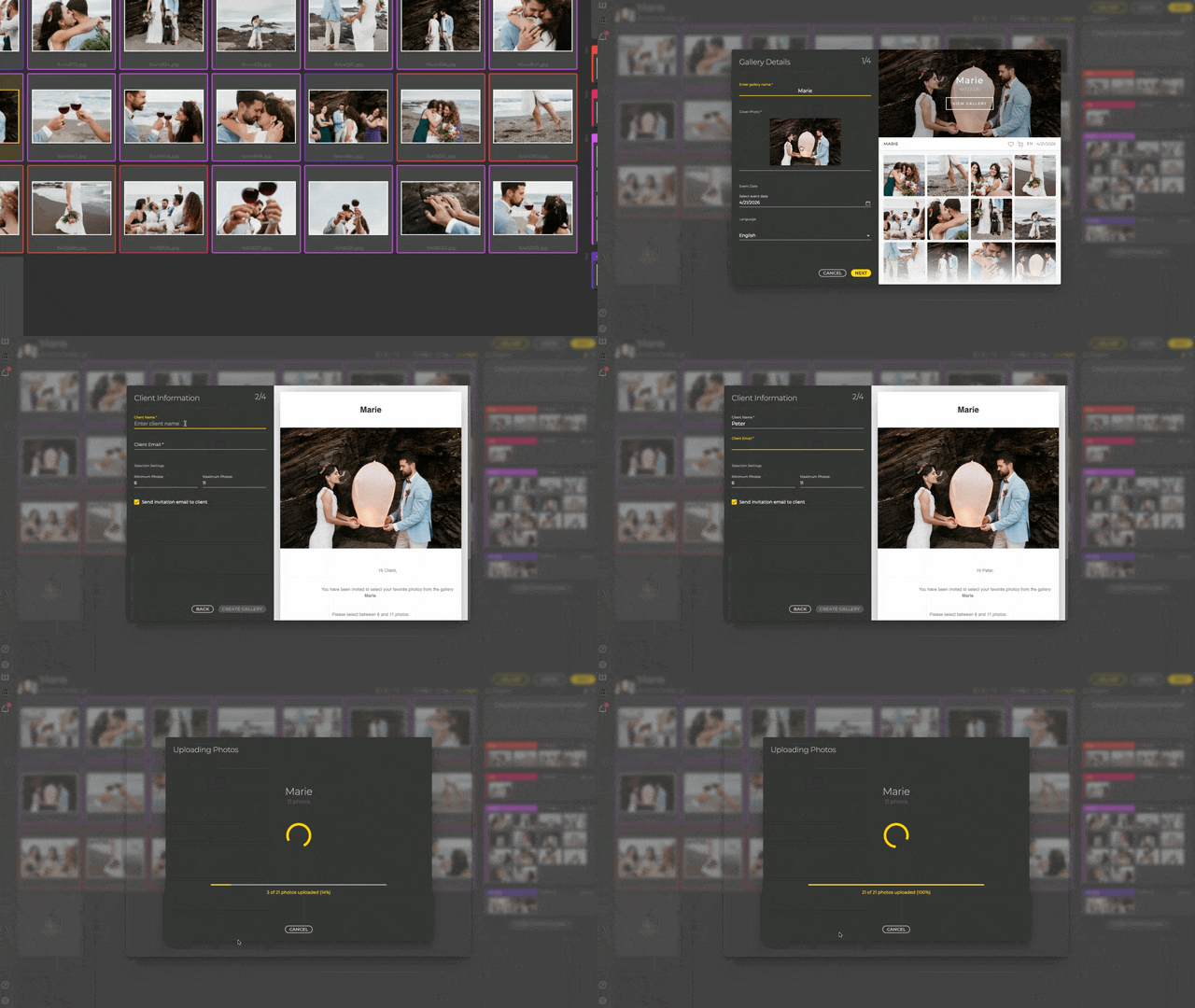
Albumteller Selection Galleries are the ultimate tool for kickstarting any album project. Forget endless email lists or disconnected third-party platforms. Simply create a custom gallery, set a minimum and maximum number of photos, and let your clients select their favorites.
Key benefits – Selection Galleries
-
Guided Client Selection: Eliminate indecision by setting mandatory minimum and maximum photo limits.
-
Instant Auto-Layout: Convert selections into a finished album design in seconds with one-click pagination.
-
One-Click Photo Swaps: Replace images instantly during the proofing stage without searching through local folders.
-
Professional Branding: Provide a high-end, intuitive interface that enhances your reputation and client trust.
-
Faster Turnaround: Save hours of admin time and emails, moving from photoshoot to final print faster than ever.
Resizing Controls
VERSION 1.8.0 | 17.04.26
More Precision
Adjust the spacing between photos and resize grids intuitively.
-
With the new photo grid control system, you have complete freedom to adjust layouts.
-
You can also adjust the page layout.
Duplicate & Replace
VERSION 1.8.0 | 17.04.26
More Eficiency
Got the perfect layout for a Christmas or newborn photo shoot? Don’t start from scratch for your next client.
-
The new “duplicate and replace” feature lets you reuse layouts you’ve created.
-
Duplicate the project, drag in the new photos, and your album is ready.
Enhanced Experience
VERSION 1.8.0 | 17.04.26
Intuitive features
We are constantly working to develop tools that elevate the photographer’s experience and ensure a premium service for the client.
-
Apply styles: Now available in the also in the manual mode the possibility to apply margin and spacing settings to all pages.
-
Import shortcuts: Improved photo panel preview and new shortcuts for chapters (photo selection and chapter creation).
-
Export sharpness: Option to select the sharpness level for exported files. This tool is available in the settings panel.
Proofing new features
VERSION 1.7.0 | 19.11.25
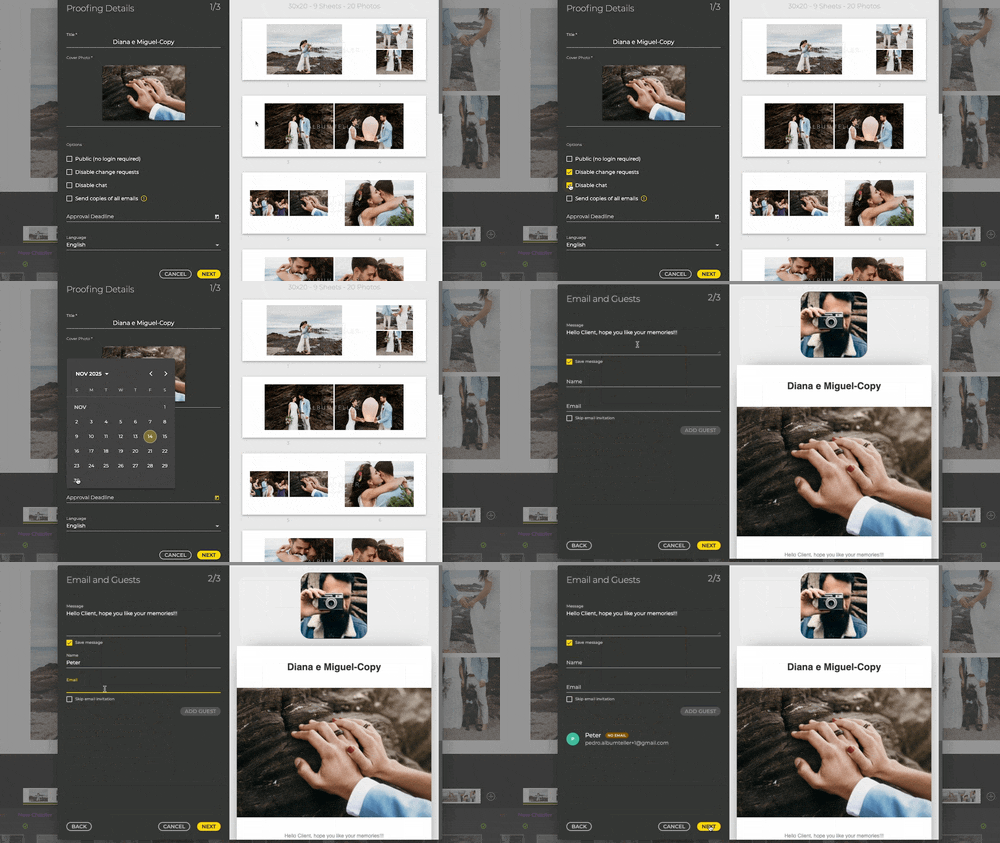
Communication & control tailored to you
The days of endless email chains and client delays are over. We listened to your feedback and completely overhauled the client proofing experience. These new tools are designed to save you days, not hours.
-
Control Client Interaction: Disable the chat or changes requests. You can also make the album public (no changes allowed). Ideal for portfolios.
-
Flexible Communication: you can now ignore the email invitation to use other communication method.
-
Multi-Language Support: Define a standard message and language for client communication, perfect for international clients.
-
Approval Deadline: Set clear expectations, create urgency to the client and be better organized around predictable deadlines.
-
Proofing report -Easily export the entire timeline (chat and changes) as a PDF for better control and proof of customer feedback.
-
Whatsapp invite – Meet your clients where they are! Copy, paste, and send– your client is ready to review the album instantly.
-
Message Badge – Quickly see which projects require your attention with the non-read message indicator on project cards.
New payment options
VERSION 1.7.0 | 19.11.25

Say goodbye to complicated transactions. We’ve streamlined the checkout process to be fast, simple, and secure.
Improvements
-
In addition to Paypal, we can accept a wide array of payment methods
-
Fast and simple payments with several credit/debit cards and Google Pay/Apple Pay
New export workflow
VERSION 1.7.0 | 19.11.25
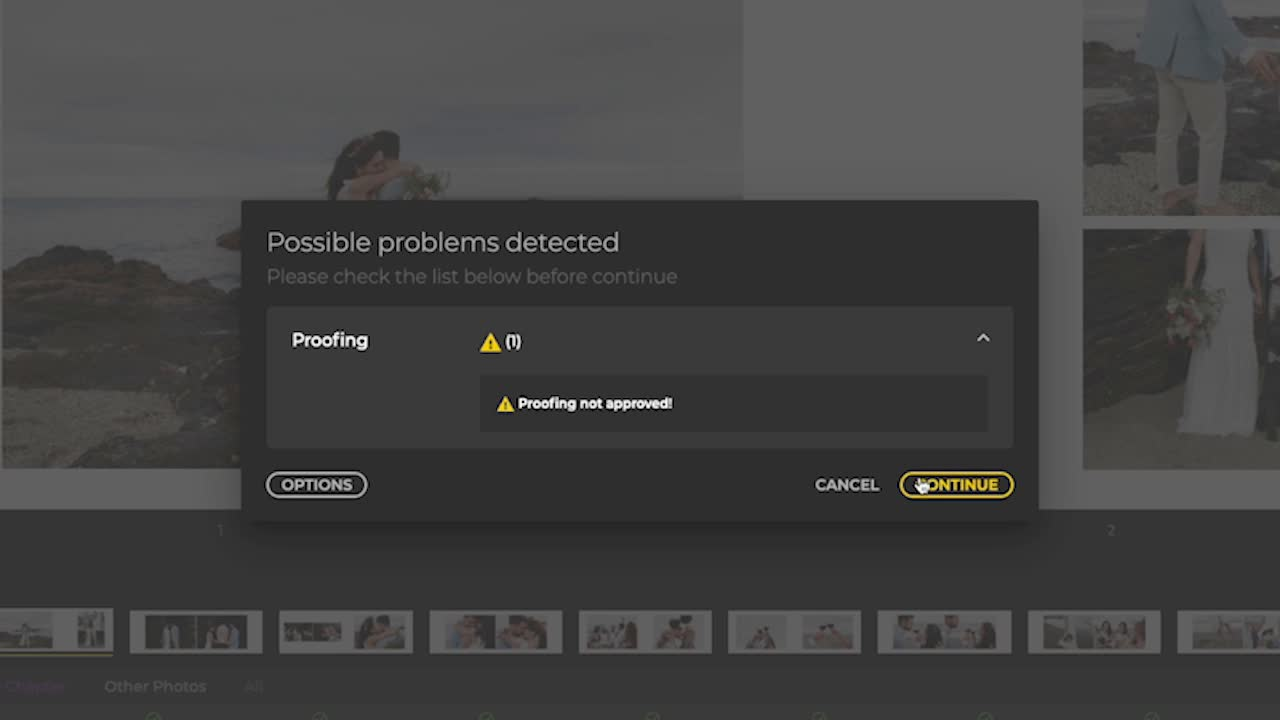
We’ve implemented a massive improvement to memory management during export and added a new flow with a comprehensive export history. Now, the system provides an explicit warning for exporting without client approval.
When you try to export a non-approved album, you now have clear options to manage your workflow:
-
Export Anyway – for quick drafts or internal use;
-
Wait for Approval – to respect the deadline
-
Export Again – after revisions;
-
Move to Completed – for final sign-off
Other key improvements
VERSION 1.7.0 | 19.11.25

Gain total control over print readiness with the new feature Smart Snapping Guides (Intelligent Bleed and Safe Area Indicators), providing dashed, real-time boundaries directly in your editor so you always stay within the lines. We also packed this update with crucial enhancements to keep your workflow running smoothly:
-
Project Status Auto-Reverse – The project status automatically reverts between Approved ↔ In-Proofing when changes are requested;
-
Rename of Padding – now is margin (in all languages except English);
-
Proofing – Guests Tab – renamed to “Settings”;
-
Names of the photos – optional display on the sheet;
-
Template styles – you can now choose to see all the combinations for a template or only the ones with same project style (same padding and gap).
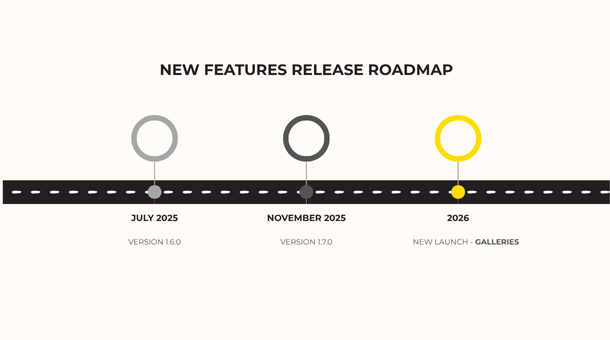
New features – Manual and auto editor
VERSION 1.6.0 | 25.07.25
Updates designed to make album creation easier and increase productivity in a smart way.
Improvements & Fixes
-
Switch between modes – Now you can start in automatic mode and switch to manual at any time during the process. More flexibility, always.
-
Auto Grid alignment –With a single click, photos are perfectly aligned without any effort. Faster and more efficient.
-
Manual editor with more features – Add, delete, edit, and rename chapters now in the manual editor.
More tools, less work. -
Shared folders – Save projects to a NAS or the cloud and access them from any device. With automatic validations. More safety and practicality.
-
Albums Preview – View the album without finishing the project or accessing Proofing. Share it with the client in your studio. Easier, with just one click.
-
Proofing Relink – Keeps the tracking of the original proof when duplicating a project.
-
Projects Archive – Save old projects and keep everything organized and easy to view.
-
New chapter “All Photos” – with useful filters for editing in applications such as Lightroom.